All Insights
Migrating from Open WebUI to Onyx: A Step-by-Step Guide for Teams

By Roshan Desai
This guide is for teams who have run Open WebUI in production, or close to it, and are now weighing a move to Onyx. It is not a comparison of features on paper. It is a practical plan for the migration itself: what maps to what, what to expect at each phase, and how long it realistically takes.
For most teams, the move is a matter of days, not months. Open WebUI and Onyx solve overlapping but different problems, so migrating rarely means a rip-and-replace of everything at once. You can stand up Onyx alongside Open WebUI, point it at the same models, and cut over gradually.
Two moments tend to trigger this migration. The first is the licensing wall: teams with 50 or more users hit Open WebUI's branding requirement and start weighing an enterprise license against alternatives. The second is a production ceiling: the team has outgrown manual file uploads and wants continuously synced connectors, document-level permissions, or governance controls that Open WebUI's chat-first design was not built to provide. If you are still deciding whether to move at all, see the Open WebUI alternatives roundup for a broader comparison first. This article assumes you already know Onyx is the target and want the how.
TL;DR: Migrate when you hit the 50+ user branding license wall, need connector-based RAG instead of manual uploads, need document-level permissions, or need governance and audit trails. Stay on Open WebUI if you are an individual, a small lab, or deeply invested in custom Pipelines that would be costly to rebuild. Architecturally, your chat UI, model endpoints, and RAG data all carry over conceptually: chat becomes Onyx chat, Ollama/OpenAI-compatible endpoints become Onyx model configs, and uploaded-file RAG becomes connector-based indexing. Expect a parallel run of a few days to a couple of weeks, not an afternoon. You gain connectors, permission-aware retrieval, enterprise search, and an MIT license. You give up some chat-UI niceties and Open WebUI's plugin ecosystem.
Should You Migrate? A Decision Checklist
Migration makes sense when your Open WebUI deployment has moved past personal or small-lab use and into company-wide territory. Migrate if:
- You have 50 or more users and are approaching, or have hit, Open WebUI's branding license requirement.
- Your knowledge lives in Slack, Google Drive, Confluence, Jira, SharePoint, or similar systems, and manual file upload no longer scales.
- You need document-level permissions so a user can only see what they could already access at the source.
- You need search plus cited answers across company knowledge, not just chat over uploaded files.
- You need governance: audit trails, SSO, RBAC, or SOC 2 for a compliance or procurement requirement.
Stay on Open WebUI if:
- You are an individual, hobbyist, or small research lab running local models for yourself or a handful of people.
- Your use case is purely local-model chat with no need for company data retrieval.
- You have built significant custom logic in Open WebUI's Tools, Functions, or Pipelines that would take real engineering time to port, and nothing else about your situation is pushing you to move.
If none of the migrate conditions apply to you, Open WebUI remains a solid, well-supported choice. This guide is for the teams where at least one of them does.
How the Architectures Map
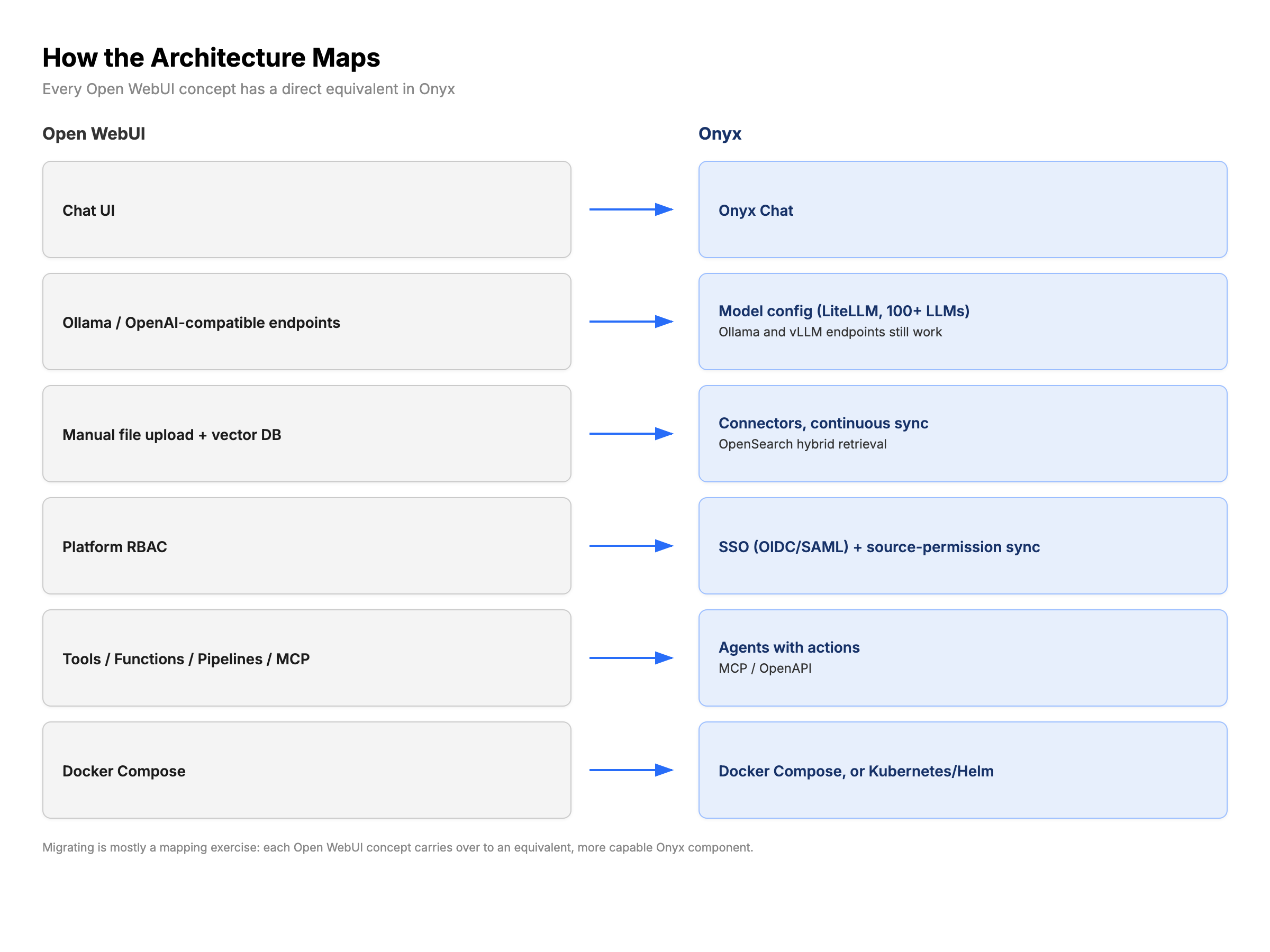
Open WebUI and Onyx are built around different core ideas: Open WebUI around a chat interface over models you configure, Onyx around continuously indexed company knowledge with chat, search, and agents on top. Even so, most Open WebUI concepts have a direct equivalent in Onyx.
| Open WebUI component | Onyx equivalent | Notes |
|---|---|---|
| Chat UI | Onyx chat | Same ChatGPT-style experience, now grounded in indexed company knowledge with citations. |
| Ollama / OpenAI-compatible endpoints | Onyx model configuration (LiteLLM-based) | Ollama and vLLM endpoints still work. Onyx also supports 100+ hosted LLMs: OpenAI, Anthropic, Google, DeepSeek, Llama, Mistral, Qwen, and more. |
| Manual file upload + vector DB (ChromaDB/PGVector/Qdrant/Milvus) | Connector-based, continuously synced indexing over OpenSearch hybrid retrieval | Instead of uploading files once, connectors keep Slack, Drive, Confluence, Jira, and other sources indexed automatically. |
| Platform user management / RBAC | SSO (OIDC/SAML) + RBAC + source-permission sync | Onyx adds permission inheritance from the source system itself, not just platform-level roles. |
| Tools, Functions, Pipelines, native MCP support | Onyx agents with actions (MCP/OpenAPI) | Custom automations generally need to be rebuilt as Onyx agent actions rather than ported directly. |
| Docker Compose | Docker Compose, or Kubernetes/Helm/Terraform for production scale | The same starting deployment model, with a clearer path to production scale. |
Step-by-Step Migration Plan
A realistic migration runs Onyx alongside Open WebUI rather than replacing it in one step. Plan for a parallel run of a few days to a couple of weeks, depending on how many data sources and how much SSO configuration you need.
- Stand up Onyx alongside Open WebUI. Deploy Onyx via Docker Compose using the Onyx docs quickstart. Leave Open WebUI running unchanged. For hardware planning, see Onyx system requirements and, if you are running local models, what LLM can I run.
- Point Onyx at the same models. If you are using Ollama or vLLM, connect the same endpoints in Onyx's model configuration. If you are using hosted APIs, add the same provider keys. This step should not change what models your team is talking to, only what platform is in front of them.
- Connect your two or three highest-value data sources first. Start with whatever your team asks about most, commonly Slack, Google Drive, or Confluence. Onyx indexes and keeps these in sync automatically, unlike Open WebUI's manual upload flow. Verify search results and citations before adding more sources.
- Configure SSO and permission sync. Set up OIDC or SAML for authentication, then confirm that document-level permissions from each connected source carry through correctly. Test with a couple of accounts that have different access levels before rolling out broadly.
- Pilot with one team. Run Onyx with a single team or department while Open WebUI stays live for everyone else. Collect feedback on retrieval quality, chat behavior, and any workflows that depended on Open WebUI's Tools or Pipelines.
- Cut over and decommission. Once the pilot team is satisfied, expand access, export anything you still need from Open WebUI, and shut it down. Keep a backup of any custom Pipelines code in case you want to rebuild specific logic as Onyx agent actions later.
What You Gain
- Connectors instead of manual uploads. Slack, Google Drive, Confluence, Jira, SharePoint, GitHub, Salesforce, Notion, and 40+ other sources sync automatically instead of requiring someone to upload files.
- Permission-aware retrieval. Access controls inherited from the source system mean AI answers respect the same boundaries as the underlying data.
- Enterprise search plus chat. Search and cited chat answers live in the same workspace, not two separate mental models.
- Deep research and agents. Multi-step research across internal knowledge, plus custom agents with MCP or OpenAPI actions.
- Governance. SSO, RBAC, audit trails, and SOC 2 Type II certification for teams that need to answer procurement or compliance questions.
- A genuinely open license. Onyx's community edition is MIT: fork it, modify it, embed it, with no branding requirements.
- A managed cloud escape hatch. If self-hosting becomes a burden, Onyx's managed cloud is available at $20/user/month billed annually, or $25/user/month billed monthly, with a 14-day free trial and no credit card required.
What You Give Up
- Open WebUI's plugin ecosystem and community themes. Custom Pipelines, community-built Functions, and UI themes do not carry over directly. You may need to rebuild specific logic as Onyx agent actions.
- Some chat-UI niceties. Open WebUI has a large, fast-moving community shipping small UX improvements to the chat experience. Onyx's chat surface is solid, but it is one part of a broader platform, not the sole focus.
- Single-container simplicity. Open WebUI can run as effectively one service on top of a database. Onyx's architecture includes OpenSearch, PostgreSQL, Redis, and Celery workers to support connectors and permission-aware search at scale, which means more services to operate, even though Docker Compose still gets you started quickly.
| Category | What you gain with Onyx | What you give up from Open WebUI |
|---|---|---|
| Data ingestion | 40+ auto-syncing connectors, continuous indexing | Simplicity of a single manual upload step |
| Permissions | Source-permission inheritance, document-level control | Nothing lost; platform RBAC is still there, plus more |
| Extensibility | Agents with MCP/OpenAPI actions | Existing Tools, Functions, and Pipelines code |
| Licensing | True MIT community edition | Nothing lost |
| Operations | Production-grade scale (OpenSearch, Kubernetes/Helm path) | Single-container operational simplicity |
| Community | Onyx's community and enterprise support | Open WebUI's larger, faster-moving open-source community |
Frequently Asked Questions
Can I keep using Ollama or local models with Onyx?
Yes. Onyx is model-agnostic and supports Ollama and vLLM endpoints directly, alongside 100+ hosted LLM options through its LiteLLM-based model configuration. You are not required to change which models you run.
Do I have to migrate my Open WebUI chat history and documents?
Documents get re-indexed from their original sources through Onyx's connectors rather than migrated as files, so the underlying knowledge is available again once you connect the relevant sources. Open WebUI does not provide an official bulk chat-history export built for platform migration. If past chat transcripts matter to your team, check Open WebUI's own documentation for current export options before decommissioning it. Treat this as something to verify, not assume.
Is Onyx harder to run than Open WebUI?
Onyx runs more services than a minimal Open WebUI deployment, because it supports connectors, permission-aware search, and production scale out of the box. Docker Compose still gets you a working deployment quickly for evaluation and small teams, and Onyx's managed cloud removes the operational burden entirely if you would rather not run those services yourself.
What does the Open WebUI license actually restrict?
In April 2025, Open WebUI moved from a BSD-3 license to a custom "Open WebUI License." Under that license, you cannot remove or modify Open WebUI's branding in a deployment with 50 or more users unless you purchase an enterprise license. The license is not OSI-approved. Full details are in Open WebUI's official license documentation.
How long does migration take?
Most teams run Onyx alongside Open WebUI for somewhere between a few days and a couple of weeks: enough time to connect data sources, configure SSO, and pilot with one team before a full cutover. The exact timeline depends mainly on how many data sources you connect and how quickly SSO and permission testing go.
Is Onyx really MIT licensed?
Yes, for the community edition. It is MIT-licensed with no branding requirements or contributor license agreement. Onyx's enterprise edition adds paid features on top, such as SAML SSO, advanced permissions, and dedicated support, but the core community edition remains genuinely MIT.
Closing Recommendation
If Open WebUI is still serving a small team or an individual running local models, there is no urgency to move. It remains one of the most popular self-hosted chat interfaces for a reason. But once the conversation shifts from "how do we host a chat UI" to "how do we give the company an AI assistant that knows our internal knowledge, respects access control, and passes a security review," a migration plan like the one above is the fastest way to get there. You can try Onyx's free community edition self-hosted or start a 14-day cloud trial with no credit card required, and run it alongside your existing Open WebUI deployment until you are ready to cut over.
Related Insights
Sovereign AI in 2026: What It Is, Why It Matters, and 8 Platforms Powering the Sovereign AI Stack
What sovereign AI means, why enterprises and governments are investing billions in it, and the 8 platforms that make up a sovereign AI stack: from Onyx and Mistral to sovereign clouds and local inference.

Self-Hosted RAG in 2026: The Complete Guide to Running Retrieval-Augmented Generation On Your Own Infrastructure
How to deploy retrieval-augmented generation on your own infrastructure. Compare self-hosted RAG platforms (Onyx, Open WebUI, LibreChat, AnythingLLM, RAGFlow, Verba) and frameworks (LlamaIndex, LangChain, Haystack), with recommended stacks for small, mid-market, and air-gapped enterprise deployments.
OpenWebUI vs. LibreChat vs. Onyx: The Complete Comparison (2026)
Compare OpenWebUI, LibreChat, and Onyx side by side. Features, architecture, enterprise readiness, and which open-source AI platform fits your team.