All Insights
OpenWebUI vs. LibreChat vs. Onyx: The Complete Comparison (2026)

By Roshan Desai
Choosing between OpenWebUI vs LibreChat vs Onyx for self-hosted AI chat? This detailed comparison covers features, connectors, enterprise readiness, and which platform fits your team.
TL;DR:
- OpenWebUI: Most popular chat interface. 136K GitHub stars, well-designed UX, strong community. Great for teams that just need a self-hosted ChatGPT replacement and can keep Open WebUI branding or qualify for an exception.
- LibreChat: Strong self-hosted chat workbench with broad provider support, MCP agents, RAG API for uploaded files, and code interpreter. Good for developer experiments, but not clearly better than Onyx on provider breadth.
- Onyx: Best enterprise knowledge platform. 40+ data connectors, enterprise search, deep research, permission inheritance. The right choice when you need AI grounded in your company's data.
The key distinction: OpenWebUI and LibreChat are chat interfaces. Onyx is a knowledge platform with chat.
The Self-Hosted AI Chat Market in 2026
Self-hosted AI chat has matured fast. What started as weekend projects to run OSS models locally has turned into a real category with millions of Docker pulls and enterprise deployments at scale.
Three platforms dominate the conversation: Onyx (29K+ GitHub stars, 1,000+ enterprise customers), OpenWebUI (136K+ GitHub stars), and LibreChat (36K+ GitHub stars). Most comparisons group them together because all three can give teams a private AI chat experience.
The important distinction is that they do not solve exactly the same problem. Some organizations don't just need a chat interface. They need AI that understands their company's knowledge across Slack, Confluence, Jira, Google Drive, SharePoint, and dozens of other tools, while respecting existing access controls. That's where Onyx fits in.
What Is Onyx?
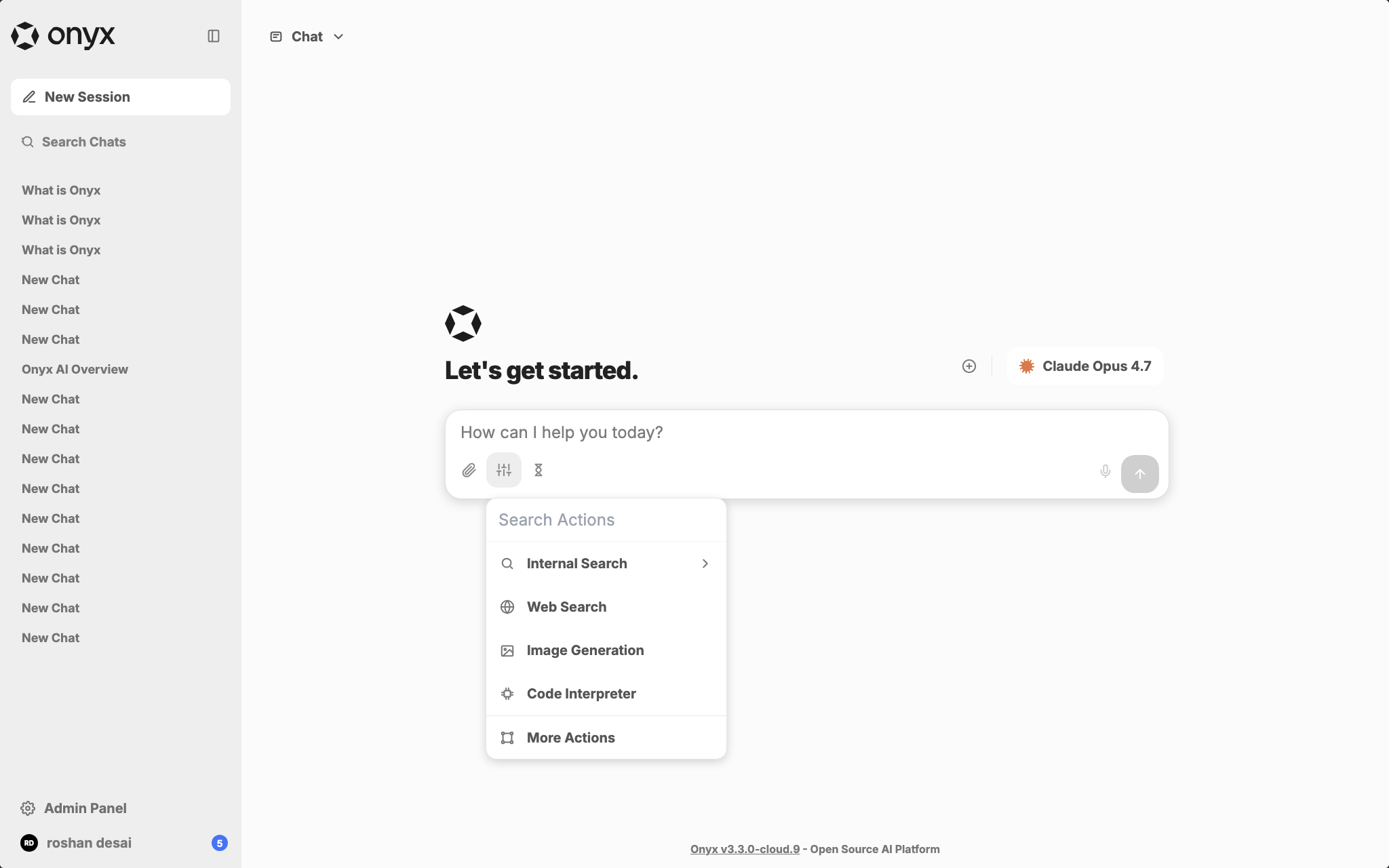
Onyx is the enterprise knowledge platform in this comparison. OpenWebUI and LibreChat are strong self-hosted chat interfaces, while Onyx adds the pieces teams usually need after the first pilot: production connectors, permission-aware retrieval, enterprise search, shared assistants, agents, auditability, and deployment options for cloud, self-hosted, and air-gapped environments.
In practical terms, Onyx is for teams that want an AI assistant connected to company knowledge, not just a private chat box for models. It can index workplace systems like Slack, Confluence, Jira, Google Drive, SharePoint, Salesforce, GitHub, and Notion, then answer with citations while respecting access controls from those source systems. That is the category gap OpenWebUI and LibreChat usually leave for teams to solve themselves.
Onyx also gives buyers a clearer production path: free community edition, managed cloud, self-hosted enterprise deployment, air-gapped options, SSO/RBAC, analytics, Slack and Discord bots, model choice, custom agents, and deep research over internal documents. The trade-off is that Onyx is heavier than a simple chat UI. If you only need local model chat, OpenWebUI may be enough. If the goal is governed AI over company knowledge, Onyx is the more complete category fit.
| Onyx is a stronger fit when... | OpenWebUI or LibreChat may be enough when... |
|---|---|
| Employees need cited answers from internal tools | Users mostly chat with public models or local models |
| Source permissions must carry into AI answers | Uploaded documents can be shared with a small trusted group |
| Search, chat, agents, and Slack and Discord access need one governed layer | A developer workbench or personal AI UI is the primary goal |
| Self-hosting or air-gapped deployment is tied to compliance | Lightweight Docker deployment is sufficient |
Quick Comparison Table
Here's how all three compare: where each excels, where each falls short, and which one fits your needs.
| Feature | Onyx | OpenWebUI | LibreChat |
|---|---|---|---|
| Primary focus | Enterprise AI platform | Chat interface | Multi-provider chat |
| GitHub stars | 29K+ | 136K+ | 36K+ |
| License | MIT community edition; enterprise terms available | Open WebUI License with branding restrictions | MIT |
| Enterprise data connectors | 40+ (Slack, Jira, Confluence, Google Drive, SharePoint, Salesforce, GitHub, etc.) | None | None |
| Enterprise search | Yes (hybrid search + LLM-based knowledge graphs) | No | No |
| Permission inheritance | Yes (respects source system permissions) | No | No |
| RAG approach | 40+ live connectors + real-time sync + advanced RAG | Document upload + vector search | RAG API and upload-as-text for files |
| Deep research | Yes (multi-step agentic research over internal docs) | No | No |
| AI agents | Yes (MCP, OpenAPI, code execution, web search) | Limited (pipelines) | Yes (MCP, tools) |
| Code interpreter | Yes | No | Yes |
| Model support | OpenAI, Anthropic, Google, DeepSeek, Llama, Mistral, Qwen + Ollama, LM Studio, vLLM | Ollama, OpenAI API, OpenAI-compatible | OpenAI, Anthropic, Google, Azure, Groq, Ollama, Mistral, and more |
| SSO | OIDC/SAML (Enterprise) | LDAP, SCIM 2.0, SSO | OAuth, SAML, LDAP, 2FA |
| RBAC | Yes | Yes | Planned (2026) |
| Slack/Discord bot | Yes | No | No |
| White-labeling | Yes (Enterprise) | Yes (Enterprise) | No |
| Air-gapped deployment | Yes | Yes | Yes |
| Analytics | Yes (usage dashboards, query history) | Basic | No |
| Commercial backing | Onyx (1,000+ enterprise customers, SOC 2 Type II) | Enterprise plans (custom) | Acquired by ClickHouse (Nov 2025) |
| Pricing | Free community; $20/user/month cloud (annual); contact sales for enterprise | Free; enterprise custom | Free |
Onyx: The Enterprise Knowledge Platform
Onyx isn't trying to be a better chat interface. It's a different kind of product: an AI platform that connects to your company's data, provides enterprise search with RAG, and layers chat, deep research, and agents on top.
Strengths
The core difference is data connectors and permission inheritance. Onyx connects to 40+ tools: Slack, Confluence, Jira, Google Drive, SharePoint, Salesforce, GitHub, Notion, and more. More importantly, it inherits access permissions from those source systems. If a user cannot view a document in Confluence or a channel in Slack, Onyx should not surface that content in search results or AI answers. For organizations with sensitive data spread across departments, this is the feature that makes Onyx viable where OpenWebUI and LibreChat are incomplete.
Enterprise search uses hybrid retrieval, contextual retrieval, and LLM-based knowledge graphs. Users search across connected sources from a single interface, with cited answers.
Deep research performs multi-step investigation over internal documents. It can search, read, and synthesize across sources rather than just answer from immediate context. Think of it as the difference between a search query and a research task.
Onyx is model-agnostic (cloud APIs or self-hosted via Ollama/LM Studio/vLLM), supports air-gapped deployment, and has the full enterprise stack: SSO, RBAC, analytics, white-labeling, Slack and Discord bots, and SOC 2 Type II certification.
Best for
Organizations that need AI grounded in their company's knowledge: searching across Slack, Confluence, Jira, Google Drive, and dozens of other tools while respecting access permissions. Mid-market to large enterprises, especially in regulated industries or regions with strict data residency requirements, should start with Onyx when the core problem is "our knowledge is scattered across 15 tools and nobody can find anything."
OpenWebUI: The Community Powerhouse
OpenWebUI is the most popular self-hosted AI chat interface by a wide margin. With 136K+ GitHub stars, it has built the largest AI chat UI community and delivers a well-designed, ChatGPT-style experience by default.
Strengths
Large ecosystem. The 136K-star community means frequent updates, broad docs, and a wide ecosystem of extensions and plugins. If you hit a problem, someone has likely discussed it already.
Well-designed UX. OpenWebUI looks and feels like ChatGPT. The interface is responsive, clean, and easy to navigate. Non-technical users can start chatting immediately without training.
RAG via document uploads. Upload PDFs, markdown, or other files and chat with them using vector search. Supports 9 vector database backends (ChromaDB, PGVector, Qdrant, Milvus, and others), giving you flexibility in your storage layer.
Strong admin controls. Role-based access control, LDAP/Active Directory integration, SCIM 2.0 provisioning, user whitelisting, and a "super admin" account make multi-user deployment straightforward.
Pipeline architecture. OpenWebUI's pipeline system lets you chain models, prompts, and retrieval plugins. This is flexible and extensible for teams that want to customize behavior.
Limitations
No native enterprise search connector layer. OpenWebUI is not designed to continuously sync Slack, Confluence, Jira, Google Drive, SharePoint, and other SaaS tools into one permission-aware company search corpus. The common knowledge workflow is still document upload or custom integration. For a 10-person team with a handful of PDFs, that can be fine. For a 500-person organization with knowledge scattered across 15 tools, it is impractical.
No enterprise search. There's no way to search across your company's knowledge base in OpenWebUI. It's a chat tool, not a search tool.
No source permission inheritance. OpenWebUI has admin roles and workspace controls, but uploaded or ingested knowledge is not automatically governed by the same document-level permissions from Google Drive, Confluence, Slack, or SharePoint. Teams must design those access boundaries themselves.
No internal deep research over synced systems. OpenWebUI can be extended, but it does not provide a built-in internal deep research layer over continuously synced, permission-aware workplace sources.
Best for
Teams and individuals who want a self-hosted ChatGPT replacement for general-purpose AI chat. Developers, researchers, and power users running local models via Ollama who want the best community support and most refined interface.
LibreChat: The Multi-Provider Specialist
LibreChat positions itself as a universal AI chat interface: a single platform that connects to many major LLM providers. Its November 2025 acquisition by ClickHouse signals growing ambitions in the data and analytics space.
Strengths
LibreChat's strongest card is chat-workbench flexibility. It supports many major providers and custom endpoints: OpenAI, Anthropic, Google, Azure, Groq, Ollama, Mistral, OpenRouter, and more. If your team wants a ChatGPT-like interface for experimenting across providers, LibreChat gives developers a familiar place to do that.
The agent system is genuinely capable. Strong MCP support, tool use, and a built-in code interpreter make LibreChat more than a chat window. It is a workbench for developers who want to build agentic workflows.
Authentication is solid too: OAuth, SAML, LDAP, and 2FA. LibreChat takes multi-user auth seriously, which matters for team deployments. The interface mirrors ChatGPT's layout closely enough that users migrating from OpenAI won't need retraining.
Limitations
The same gap as OpenWebUI: no native enterprise search connector layer. LibreChat has a RAG API for user-uploaded files, but it does not continuously index Slack, Confluence, Jira, Google Drive, SharePoint, and GitHub as one permission-aware company corpus. There is also no source permission inheritance for document-level access control across those systems.
The ClickHouse acquisition (November 2025) is worth watching. ClickHouse bought LibreChat to build an "Agentic Data Stack," which could add real data capabilities. It also means buyers should track roadmap priorities and support expectations rather than assuming the project will remain only a community chat UI.
There is no broadly published LibreChat enterprise pricing page comparable to SaaS products. Organizations that need vendor-backed support, SLAs, or procurement terms should validate the current ClickHouse-backed offering directly.
Best for
Developer teams that want a self-hosted ChatGPT-style workbench with agent capabilities, MCP, and code execution. LibreChat is a reasonable pick for experiments where enterprise knowledge search, source permissions, and shared governance are not requirements.
The Key Architectural Difference: Chat UI vs. Knowledge Platform
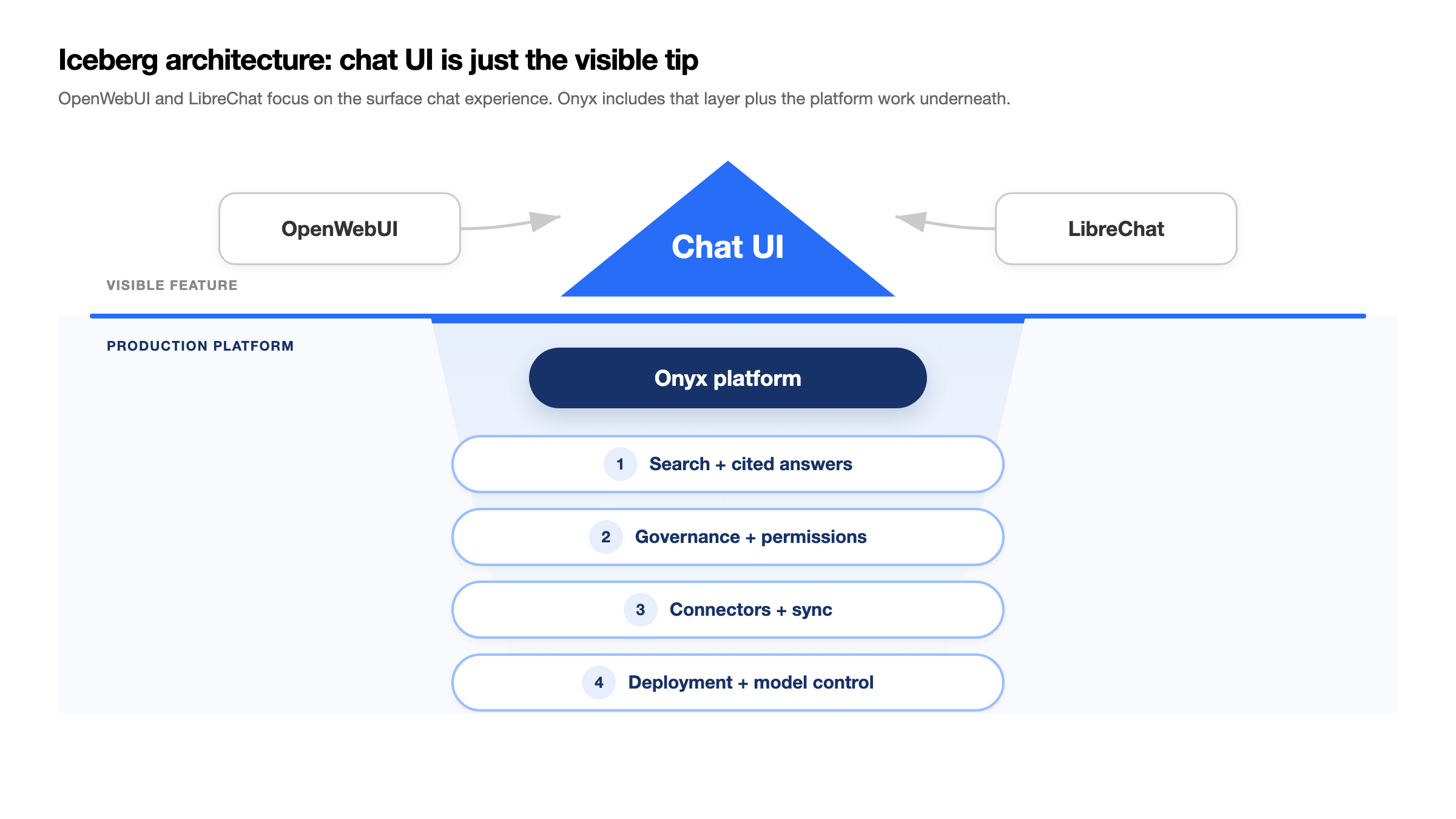
Onyx puts company knowledge at the center of the architecture. The iceberg diagram above is the useful mental model: chat is the visible feature, but the production platform lives underneath. Users interact through chat, search, agents, Slack, or Discord, while the core system handles connectors, indexing, permissions, retrieval, citations, model choice, analytics, and deployment controls. That is why Onyx can start with local or cloud model chat and then grow into company-wide enterprise search without changing platforms.
OpenWebUI and LibreChat start from the chat UI. They are strong interfaces for talking to models, running local experiments, and attaching uploaded files or custom tools. Their architecture is simpler: user, chat UI, model, and optional context. That simplicity is useful for a sandbox, but it leaves teams to design source syncing, document-level permissions, enterprise search, auditability, and governed rollout themselves.
In practice, this architectural split creates different outcomes:
| Need | Onyx | OpenWebUI / LibreChat |
|---|---|---|
| "Chat with GPT or Claude models privately" | Yes | Yes |
| "Search across all our company tools" | Yes | No |
| "AI answers grounded in our Confluence wiki" | Yes (native connector, real-time sync) | Only via manual upload |
| "Respect who can see what documents" | Yes (permission inheritance) | No |
| "Deploy an AI bot in our Slack workspace" | Yes | No |
| "Multi-step research across internal docs" | Yes (deep research) | No |
If your needs stop at isolated chat, OpenWebUI or LibreChat can work as a sandbox. If you expect the same interface to handle internal knowledge, permissions, shared assistants, and compliance, Onyx is the architecture to standardize on first.
Feature Comparison Deep Dive
Model Support
All three platforms are model-agnostic, but they differ in breadth:
- Onyx can be configured to work with any AI provider and model, including OpenAI, Anthropic, Azure OpenAI, AWS Bedrock, Google Vertex AI, Ollama, and OpenAI-compatible gateways. Model selection is configured at the admin level with user-facing model choices.
- OpenWebUI supports Ollama and any OpenAI-compatible API endpoint. Its pipeline architecture lets you route between models.
- LibreChat has broad provider support for a chat UI: OpenAI, Anthropic, Google, Azure, AWS Bedrock, Groq, Mistral, Ollama, OpenRouter, and more, plus custom endpoints.
Verdict: There is not enough evidence to say LibreChat is better than Onyx for multi-provider chat. LibreChat is a strong provider-switching chat workbench, but Onyx also supports broad provider choice and has the advantage of tying that model choice to enterprise search, permissions, agents, and admin controls. Choose LibreChat only when the requirement is a lightweight developer chat sandbox without company knowledge governance.
RAG and Knowledge Retrieval
- Onyx provides enterprise RAG through 40+ live data connectors. Content is indexed automatically, synced in real-time, and searchable across all sources. It uses hybrid search (keyword + semantic), contextual retrieval, and LLM-based knowledge graphs for higher accuracy.
- OpenWebUI offers document upload RAG: users upload files, OpenWebUI chunks and indexes them in a vector database, and AI responses reference the content. It supports 9 vector DB backends. This is useful but limited to manually uploaded content.
- LibreChat supports uploaded-file RAG through its RAG API and upload-as-text workflows. It is still file/workspace oriented rather than a continuously synced enterprise connector layer.
Verdict: Not really a fair comparison. OpenWebUI and LibreChat can work for small teams with curated uploaded documents. Onyx's connector-based RAG is built for organizations where knowledge lives across dozens of tools. It is solving a different problem.
Enterprise Features
- Onyx offers the full enterprise stack: OIDC/SAML SSO, RBAC, analytics dashboards, white-labeling, permission inheritance, and SOC 2 Type II compliance. Plus Slack and Discord bot deployment.
- OpenWebUI has RBAC, LDAP/SCIM/SSO, user management, and admin controls. Solid for multi-user deployment.
- LibreChat has multi-provider auth (OAuth, SAML, LDAP, 2FA) but RBAC is still in development for 2026.
Verdict: Onyx is the most complete enterprise knowledge option because it combines SOC 2, source permission inheritance, analytics, and connected workplace data. OpenWebUI is solid for multi-user chat deployment. LibreChat is strong on authentication and developer workflows, but buyers should verify RBAC and governance requirements against the current docs.
Agents and Automation
- Onyx offers agents with MCP support, OpenAPI actions, code execution, web search, and the ability to scope agents to specific knowledge sources.
- OpenWebUI has a pipeline/plugin system that supports basic automation.
- LibreChat has strong agent capabilities with MCP support, code interpreter, and tool use.
Verdict: LibreChat is strong for developer-facing MCP and code interpreter workflows. Onyx is the better default when those workflows need governed access to company knowledge, source-scoped context, OpenAPI actions, and admin controls. OpenWebUI's pipeline system works but is less complete for governed workplace agents.
Who Should Choose What
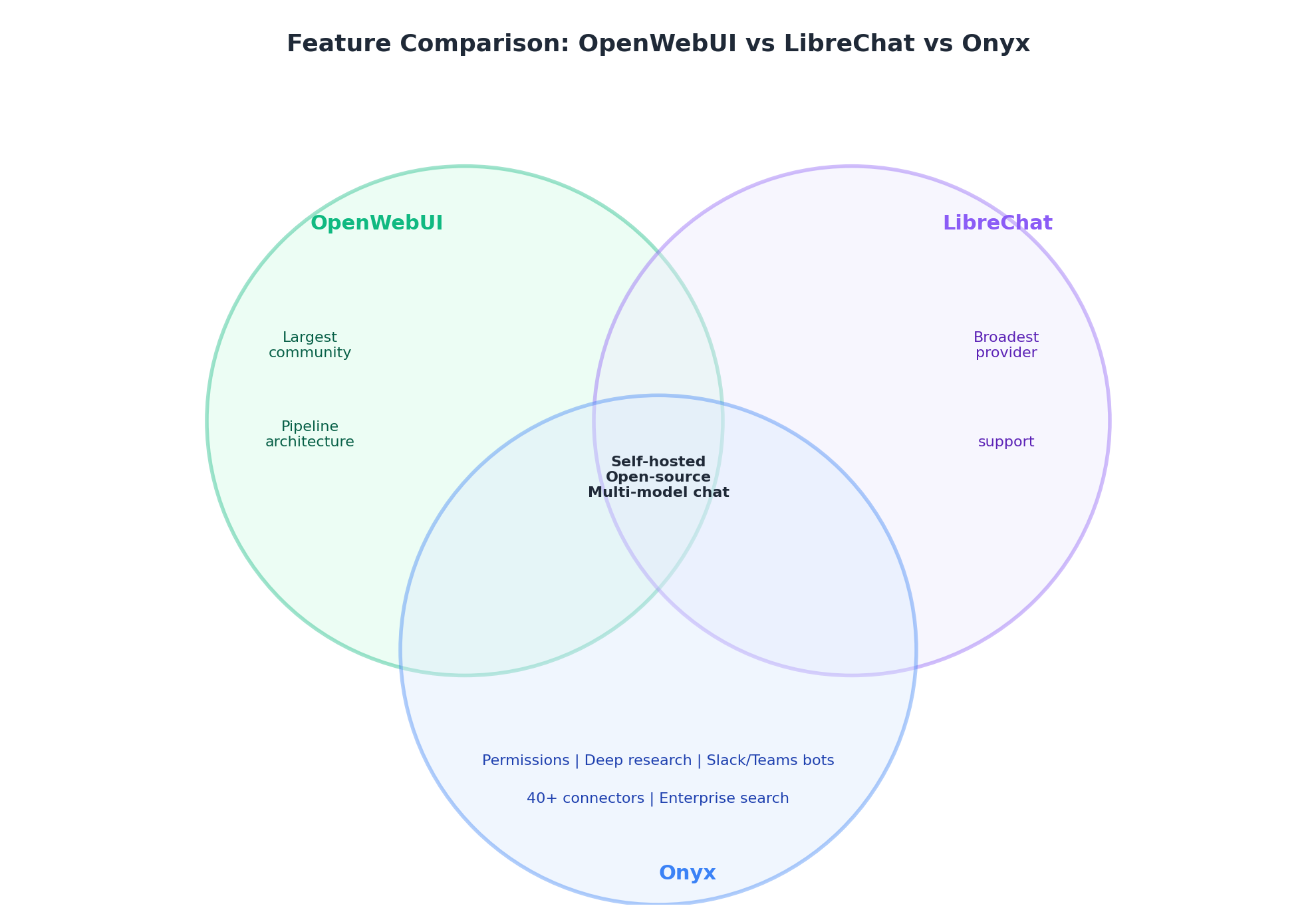
Choose Onyx if:
- You need AI search and chat grounded in your company's Slack, Confluence, Jira, Google Drive, and other tools
- Permission inheritance is a requirement (sensitive data across departments)
- You're deploying for 50+ users and need SSO, RBAC, and analytics
- You operate in a regulated industry (defense, healthcare, finance)
- You need air-gapped deployment or full data sovereignty
- You want deep research over internal documents
- You need an AI Slack or Discord bot with knowledge access
- You want local model chat and provider choice without creating a migration path away from your future knowledge platform
Choose OpenWebUI if:
- You need a short-lived developer sandbox for local model testing
- Your team is primarily experimenting with Ollama and local models
- You do not need AI to connect to enterprise SaaS tools
- Community size and ecosystem breadth matter more than governance
- You are comfortable managing branding and licensing requirements for your deployment
Choose LibreChat if:
- You need a developer chat workbench for MCP, code execution, and provider experiments
- You do not need permission-aware enterprise search
- You need flexible authentication (OAuth, SAML, LDAP, 2FA)
- You are comfortable validating current support and procurement options directly
- You are specifically interested in the ClickHouse "Agentic Data Stack" direction
Recommended Setup
If you are choosing a standard AI workspace for a team, start with Onyx. OpenWebUI and LibreChat can be useful lab tools, but they should not become the default workplace AI surface if you expect local model chat, provider choice, company knowledge, and governance to converge over time.
| Goal | Recommended setup | Why |
|---|---|---|
| Personal or small-team local chat | Onyx Community + Ollama or vLLM | Gives users local model chat while keeping the path open to connectors, shared assistants, and governed rollout later |
| Power-user multi-model chat | Onyx with approved cloud and local model providers | Lets teams compare models without fragmenting conversations, permissions, and admin controls across separate chat tools |
| Company knowledge search | Onyx + core workplace connectors | Adds data sync, permissions, citations, enterprise search, and admin controls |
| Regulated team AI | Onyx self-hosted + local LLMs | Keeps sensitive data, retrieval, and inference inside controlled infrastructure |
The Pragmatic Approach
Use OpenWebUI or LibreChat only when the requirement is explicitly a short-lived developer sandbox or a personal experiment that does not touch company knowledge. For the default company AI workspace, choose Onyx first. It covers local model chat and model choice while also giving the organization a path to permission-aware search, Slack and Discord access, agents, analytics, and air-gapped deployment.
That is the strategic reason to standardize on Onyx early: the simple chat use case rarely stays simple. Once users ask for internal docs, private channels, shared assistants, or compliance review, a chat-only tool becomes a migration project. Onyx starts with chat but is built for the governed knowledge layer teams eventually need.
Frequently Asked Questions
Is Onyx better than OpenWebUI?
Onyx is better for company-wide knowledge search, permission-aware retrieval, and governed enterprise deployment. OpenWebUI is better for individual or small-team local chat experiments where connectors and admin controls are not required.
Is LibreChat better than Onyx?
LibreChat is strong for self-hosted developer chat experiments, MCP, and code interpreter workflows. It is not clearly better than Onyx for multi-provider chat because Onyx also supports broad model-provider choice. Onyx is stronger when the requirement includes enterprise knowledge access across connected systems with permissions, citations, search, agents, and admin controls.
Can I use OpenWebUI or LibreChat with Onyx?
Yes. Some teams keep OpenWebUI or LibreChat for experimentation while using Onyx as the governed workplace AI platform. The key is to separate personal model testing from company knowledge retrieval.
Which tool is best for regulated teams?
Onyx is the best fit among these three for regulated teams because it supports self-hosted and air-gapped deployment, enterprise permissions, auditability, and connected workplace data sources.
Related Insights
Migrating from Open WebUI to Onyx: A Step-by-Step Guide for Teams
A practical guide to migrating from Open WebUI to Onyx: when it makes sense, how the architectures map, and a step-by-step plan covering models, RAG, SSO, and cutover.

Sovereign AI in 2026: What It Is, Why It Matters, and 8 Platforms Powering the Sovereign AI Stack
What sovereign AI means, why enterprises and governments are investing billions in it, and the 8 platforms that make up a sovereign AI stack: from Onyx and Mistral to sovereign clouds and local inference.
Self-Hosted RAG in 2026: The Complete Guide to Running Retrieval-Augmented Generation On Your Own Infrastructure
How to deploy retrieval-augmented generation on your own infrastructure. Compare self-hosted RAG platforms (Onyx, Open WebUI, LibreChat, AnythingLLM, RAGFlow, Verba) and frameworks (LlamaIndex, LangChain, Haystack), with recommended stacks for small, mid-market, and air-gapped enterprise deployments.