All Insights
How to Self-Host LLMs for Your Team (Comprehensive 2026 Guide)

By Roshan Desai
TL;DR: Running a local LLM is the easy part. Deploying AI for your team requires a full stack: model serving, a chat interface, knowledge retrieval (RAG), connectors to your data, and authentication. This guide maps every layer, compares the DIY approach to integrated platforms like Onyx, and provides recommended configurations for teams of every size.
Why Teams Need More Than Just a Local LLM
There's no shortage of tutorials for running an LLM locally. Install Ollama, pull a model, start chatting in your terminal. You can do it in five minutes.
But there's a chasm between "I can run a model on my laptop" and "my team of 50 people can use AI, grounded in our company's knowledge, with proper access controls." That chasm is the self-hosted LLM stack.
Here's what happens when an individual's LLM experiment becomes a team's AI deployment:
- Multiple users need access. You need a web interface, user accounts, and session management.
- Responses need to be grounded in company data. Generic LLM knowledge isn't enough. Your team needs answers from your Confluence wiki, Slack history, Jira tickets, and Google Drive documents.
- Access controls matter. The engineering team's confidential roadmap documents shouldn't appear in sales team members' AI responses.
- Someone needs to manage it. Admins need dashboards, usage analytics, model configuration, and user management.
- It needs to be reliable. A personal Ollama instance crashing is an inconvenience. A team's AI platform going down during a product launch is a problem.
This guide maps the complete self-hosted LLM stack for teams and compares your options at each layer.
What Is Onyx?
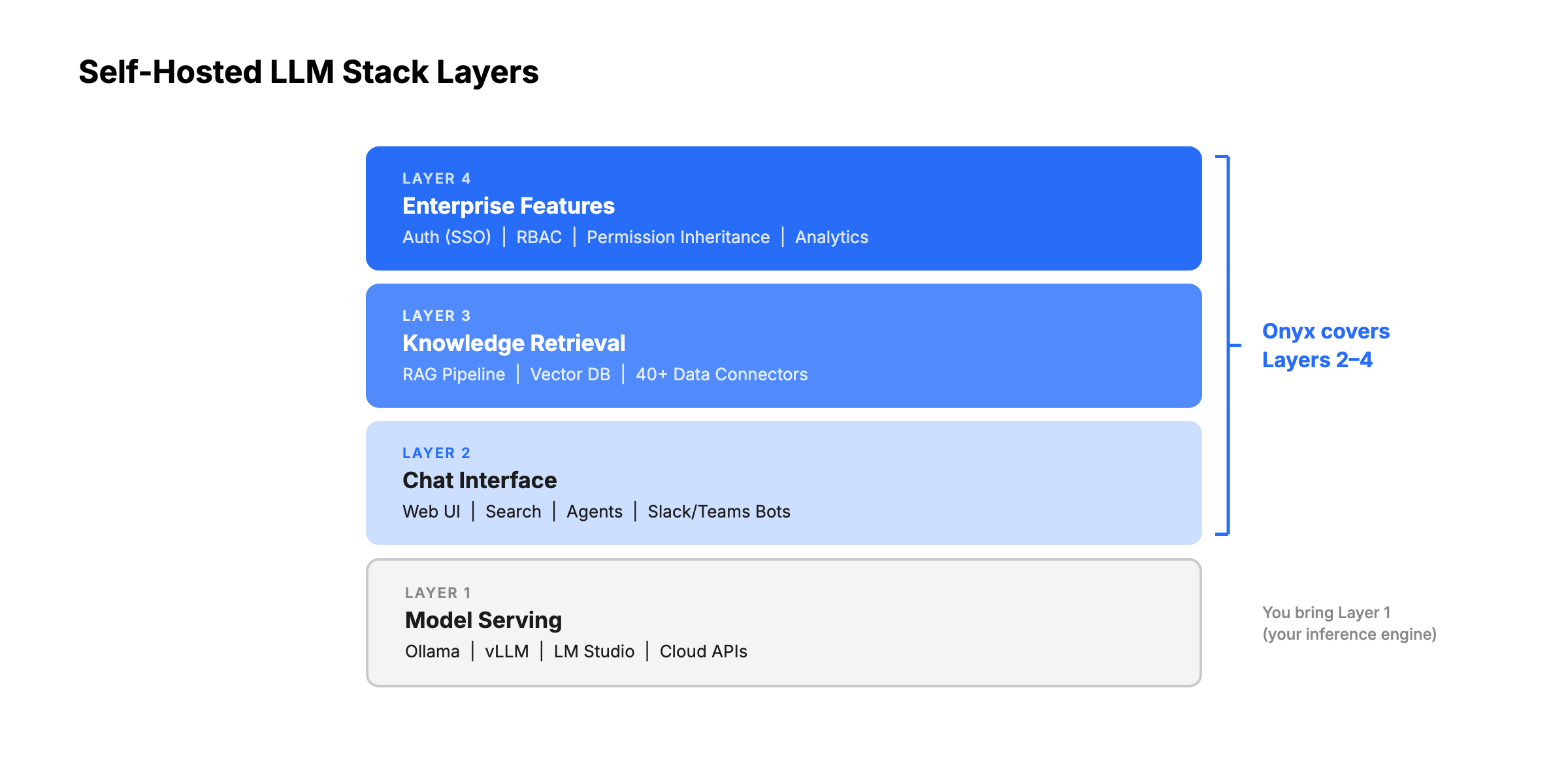
Onyx is the team-facing layer for a self-hosted LLM deployment. The model server handles inference, but Onyx handles the parts users actually need at work: connectors, permission-aware search, citations, AI chat, agents, Slack or Teams access, and deep research over internal documents.
For teams starting with Ollama, vLLM, SGLang, or LM Studio, Onyx provides a path from local model experiments to a managed workplace AI system. You can keep sensitive workloads on local models, use hosted frontier models for harder tasks, and present both through a single governed interface.
The Self-Hosted LLM Stack: What You Actually Need
Layer 1: Model Serving (Inference Engine)
The foundation of any self-hosted LLM deployment. This layer runs the model on your hardware and exposes an API endpoint.
A good inference engine exposes an OpenAI-compatible API so your platform layer works regardless of which engine you pick. It should support your GPU hardware, handle quantization so you can run large models on smaller cards, and let you swap models without restarting the whole service.
A great inference engine also scales gracefully under concurrent load through continuous batching, so 50 users hitting it at once don't degrade response times for everyone.
Ollama — A popular entry point. One command downloads and runs models. Exposes an OpenAI-compatible API. Bundles llama.cpp under the hood and handles quantization automatically.
- Strengths: Easy setup, broadest model library, hot-swap models without restart
- Limitations: Lower throughput under concurrent load (41 TPS peak vs. vLLM's 793 TPS on Llama 3.1 8B, A100 GPU), not optimized for high-concurrency production
- Best for: Teams under 20 users, development/testing, environments where model flexibility matters more than throughput
vLLM — Built for production inference. Uses PagedAttention to virtually eliminate KV-cache memory waste (from 60-80% in traditional systems to under 4%) and increase throughput by 2-4x compared to prior serving systems. Benchmarks show 793 TPS peak vs. Ollama's 41 TPS on the same hardware (Llama 3.1 8B, A100 GPU).
- Strengths: Highest throughput, lowest latency under load, continuous batching, broad GPU support (NVIDIA, AMD ROCm, Intel, TPU)
- Limitations: Steeper setup, requires restart to switch models
- Best for: Teams of 20+ users with concurrent access, production deployments where performance matters
SGLang — High-performance serving framework from LMSYS (the team behind Chatbot Arena). RadixAttention engine caches repeated prompt prefixes in the KV-cache, making it especially fast for chatbot-style workloads where users share system prompts.
- Strengths: ~29% higher throughput than vLLM on H100 GPUs, with additional gains on multi-turn workloads from RadixAttention cache hits. Structured output generation up to 10x faster, native TPU support
- Limitations: Newer ecosystem than vLLM (fewer community resources and integrations), requires NVIDIA, AMD, or TPU hardware
- Best for: Maximum throughput for chat workloads, structured output generation, or TPU-based deployments
LM Studio — Desktop application with a graphical interface. Users can browse, download, and run models without touching a terminal. Supports Vulkan offloading for machines without dedicated GPUs.
- Strengths: Non-technical friendly, excellent for demos and evaluation, good Apple Silicon performance
- Limitations: Desktop-first (not designed for server deployment), proprietary/closed-source, not suitable for multi-user team serving
- Best for: Individual exploration, evaluating models before server deployment, non-technical stakeholders
Comparing Inference Engines: Ollama vs. vLLM vs. SGLang vs. LM Studio
| Feature | Ollama | vLLM | SGLang | LM Studio |
|---|---|---|---|---|
| Setup difficulty | Easy (one command) | Moderate (Python, CUDA) | Moderate (Python, CUDA) | Easy (desktop app) |
| Throughput (peak) | ~41 TPS | ~793 TPS | ~29% faster than vLLM | N/A (desktop use) |
| Concurrent users | Good for <20 | Designed for 20-1000+ | Designed for 20-1000+ | Single user |
| Model hot-swap | Yes (on-the-fly) | No (requires restart) | No (requires restart) | Yes (GUI selection) |
| GPU support | NVIDIA, AMD, Apple Silicon | NVIDIA, AMD, Intel, TPU | NVIDIA, AMD, TPU | NVIDIA, AMD, Apple Silicon, Vulkan |
| API compatibility | OpenAI-compatible | OpenAI-compatible | OpenAI-compatible | OpenAI-compatible |
| Quantization | Automatic | Manual/native | Manual/native | Automatic |
| Open-source | Yes | Yes | Yes | No (proprietary, free to use) |
| Best for | Getting started, small teams | Production, high concurrency | Max throughput, structured output | Exploration, demos |
Key takeaway
Use Ollama to start. Switch to vLLM or SGLang when you need production performance at scale. SGLang tends to outperform vLLM on chat workloads and structured output, while vLLM has the more mature ecosystem and broader community support. All three expose OpenAI-compatible APIs, so the platform layer (Onyx, OpenWebUI, LibreChat) works with any of them without changes.
Layer 2: Chat Interface
A model API, alone, isn't user-friendly. This layer provides the web-based chat experience your team interacts with.
A good chat interface gives each user their own conversation history, lets them upload documents for ad-hoc context, and connects to multiple backend models.
A great one goes further: shared conversations so teams can collaborate on research, prompt templates and reusable agents that non-technical users can build and share, web search, deep research, and tool use built in, and admin controls for managing users and models from a single dashboard.
Onyx is a full-featured AI platform including chat, agents, web search, image generation, deep research, and MCP. For larger organizations, Onyx goes even further, with 40+ native connectors to your data sources like Drive, Slack, and Confluence, SSO with SCIM to maintain RBACs, and even a Slack bot to meet your team where they work.
OpenWebUI is one of the most popular self-hosted chat interfaces. It offers a polished, ChatGPT-style UX with conversation history, model selection, and RBAC. Built-in document upload RAG lets users attach files for context, though retrieval reliability is a common pain point. A pipeline architecture allows community-built plugins for custom functionality, and it supports Ollama and any OpenAI-compatible backend out of the box.
LibreChat is a multi-provider chat interface that connects to OpenAI, Anthropic, Google, Azure, and local models through a single UI. It stands out for its MCP-based agent support, built-in code interpreter, and the most mature authentication stack of any open-source chat UI (OAuth, SAML, LDAP, 2FA). LibreChat was acquired by ClickHouse in late 2025, signaling enterprise ambitions.
The difference: OpenWebUI and LibreChat are pure chat interfaces that sit on top of your inference engine. Onyx is a complete platform where you can customize, collaborate with, and extend your AI agents, all in a single deployment.
Layer 3: Knowledge Retrieval (RAG + Connectors)
This is where DIY stacks get complicated. Running a model and providing a chat UI is straightforward. Connecting that model to your company's actual knowledge is hard to get right.
A good knowledge layer connects to the tools your team already uses and keeps that data indexed and up to date.
A great one does it without any custom code. Native connectors that sync in real time, permission inheritance that respects who can see what in the source system, hybrid search that combines keyword and semantic retrieval so results are actually accurate, and cited sources in every response so users can verify and trust the answers.
This layer is the hardest to build yourself and the easiest to underestimate.
The RAG pipeline: To ground AI responses in your data, you need:
- Data connectors to pull content from your tools (Slack, Confluence, Jira, Google Drive, etc.)
- A document processing pipeline to chunk, embed, and index that content
- A vector database to store embeddings (PGVector, Qdrant, Milvus, ChromaDB, etc.)
- A retrieval system to find relevant content when users ask questions
- A synthesis layer to combine retrieved context with LLM generation
The DIY approach: OpenWebUI includes built-in RAG with document upload, an embedded vector database (ChromaDB), and hybrid search. On paper, this covers the basics. In practice, users widely report unreliable retrieval quality, broken hybrid search across versions, ChromaDB scaling issues under concurrent load, and poor default chunking. Many teams end up building custom RAG pipelines anyway. For live enterprise data from tools like Slack, Confluence, or Jira, OpenWebUI has no native connectors. You would need to build custom ETL pipelines or configure community MCP servers, with no permission inheritance from source systems.
The integrated approach: Onyx handles the entire RAG pipeline by default. Its 40+ native connectors pull data from enterprise tools, sync in real-time, and index content automatically. Hybrid search (keyword + semantic), contextual retrieval, and LLM-based knowledge graphs deliver accurate, cited answers without custom engineering. Additionally, Onyx's custom agent harness means complex questions are tackled by a team of AI that divide and conquer, rather than a single search attempt like most other RAG applications.
Layer 4: Enterprise Features
The layer that separates personal tools from organizational platforms.
A good enterprise layer handles SSO so users log in with existing credentials and RBAC so admins control who sees what.
A great one also inherits permissions from source systems automatically, provides usage analytics for governance, maintains a full audit trail for compliance, and supports white-labeling so the platform feels like an internal tool rather than a third-party product.
- Authentication: SSO (OIDC/SAML), LDAP, OAuth, so users sign in with their existing corporate credentials. Even better, SCIM to inherit custom configs from your IdP
- Authorization (RBAC): Role-based access controls so admins can manage who can access what features and data
- Permission inheritance: The AI should respect source system permissions. If someone can't access a Confluence space, they shouldn't see its content in AI answers
- Analytics: Usage dashboards, query history, and admin visibility for governance and optimization
- Audit trail: Logging of AI interactions for compliance and oversight
- White-labeling: Custom branding for internal rollout
The DIY Stack Approach
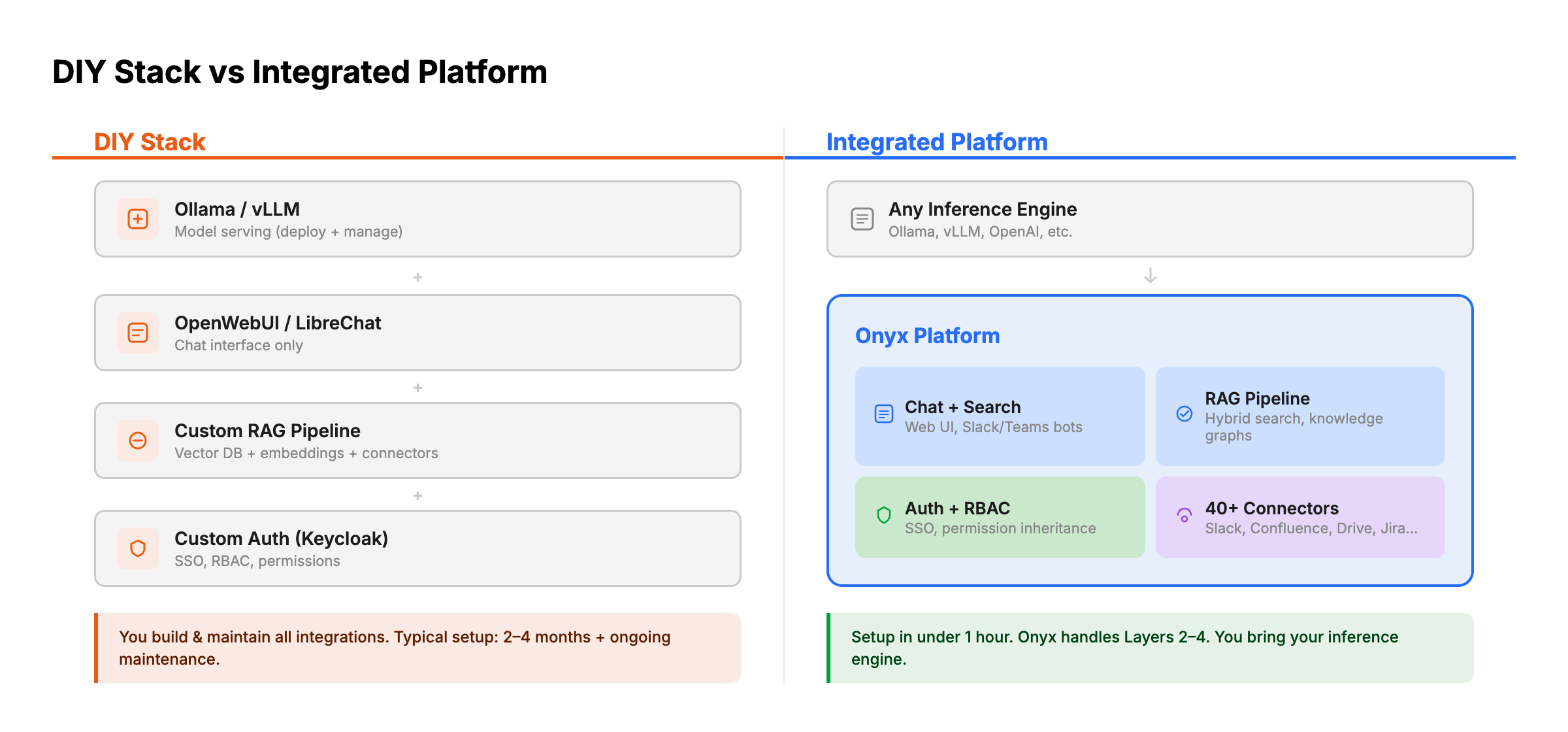
Some teams build their own stack by combining individual components. Here's what that looks like:
Typical DIY stack:
- Inference: Ollama, vLLM, or SGLang
- Chat UI: OpenWebUI or LibreChat
- RAG framework: LlamaIndex, LangChain, or Haystack for retrieval and synthesis pipelines
- Vector database: PGVector, Qdrant, or Milvus
- Embedding model: Self-hosted via the inference provider
- Data pipeline: Custom scripts or n8n workflows to sync data from tools
- Authentication: Keycloak, Authentik, or Auth0 (separate deployment)
- Monitoring: Langfuse (self-hosted) for LLM observability
Advantages:
- Maximum flexibility and control over every component
- Can optimize each layer independently
- No vendor dependency for any layer
- Educational: your team deeply understands the architecture
Disadvantages:
- Significant engineering effort to build and maintain (typically 2-4 months for initial setup, ongoing maintenance)
- Data connectors must be built custom for each source (Slack API, Confluence API, Jira API, etc.)
- Permission inheritance is extremely hard to implement correctly across multiple data sources
- No unified admin interface; each component has its own management plane
- Integration testing across components adds complexity
- Every upgrade to one component risks breaking others
- No single vendor to call when something breaks
Realistic assessment: The DIY approach works well for indie hackers and small teams that want customization. It doesn't work well for organizations that want to deploy AI for end users quickly, or for teams without dedicated DevOps/MLOps resources. Even with these resources, it can become a headache to juggle all of the different applications and vendors on top of the development and maintenance.
The Integrated Platform Approach: Onyx
Onyx takes a different approach. Instead of requiring teams to assemble and maintain a multi-component stack, it provides Layers 2 through 4 in a single deployment, then connects to any Layer 1 inference engine.
What Onyx handles (Layers 2-4):
- Chat interface and enterprise search with chat sharing, collaboration, and search across all connected data sources
- 40+ native data connectors (Slack, Confluence, Jira, Google Drive, SharePoint, Salesforce, GitHub, Notion, and more) with real-time sync and permission inheritance
- Advanced RAG pipeline including hybrid search, contextual retrieval, and LLM-based knowledge graphs
- Enterprise auth and compliance (SSO via OIDC/SAML, RBAC, analytics, white-labeling, SOC 2 Type II)
What you bring:
- Your inference engine of choice (Ollama, vLLM, SGLang, LM Studio, or cloud APIs)
- Docker or Kubernetes infrastructure
- Your data sources (connect via the admin UI with no coding required)
Deployment: Docker Compose for small to mid-size teams, Kubernetes (Helm chart) for large enterprise deployments. Initial setup to first query takes under an hour.
Pricing: The community edition is free and fully functional (MIT license). Certain features, only needed in large deployments (SSO, RBAC, white-labeling, dedicated support), require the enterprise plan.
Cost Analysis: API Costs vs. Self-Hosted GPU Costs
One of the primary motivations for self-hosted LLMs is cost control. Here's how the math works:
Cloud API costs (for reference)
| Provider | Model | Cost (per 1M tokens) |
|---|---|---|
| OpenAI | GPT-5.4 | ~$2.50 input / $15 output |
| Anthropic | Claude Sonnet 4.6 | ~$3 input / $15 output |
| Gemini 3.1 Pro | ~$2 input / $12 output | |
| Moonshot | Kimi K2.5 | ~$0.60 input / $3.00 output |
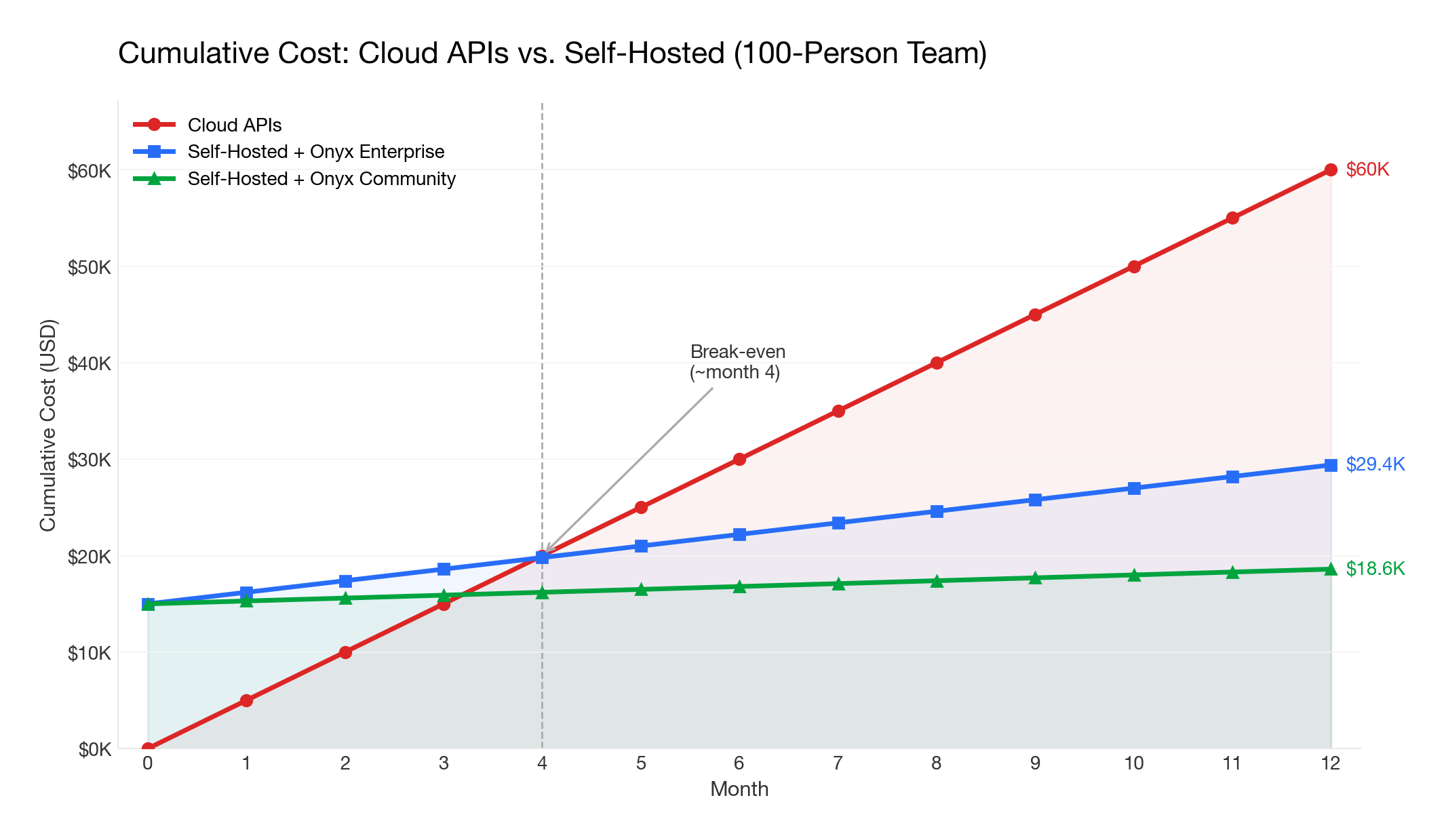
For a team of 100 users averaging 50 queries/day with ~2,000 tokens per query, monthly API costs range from $1,000-$5,000 depending on the provider and model.
Self-hosted GPU costs
| Setup | Hardware | Approximate Cost | Capacity |
|---|---|---|---|
| Small team (5-20 users) | 1x RTX 5090 (32GB) or Mac Studio (M4 Max) | $3,000-$5,000 one-time | 27B-35B models (quantized), adequate for light use |
| Mid-size team (20-200 users) | 1x NVIDIA H100 (80GB) or 2x RTX 5090 | $25,000-$35,000 one-time | 70B-122B MoE models (quantized), moderate concurrent use |
| Large team (200-1000+ users) | 4-8x NVIDIA H200/B200 or cloud GPU instances | $120,000-$500,000 one-time (or $8,000-$20,000/month cloud GPU) | 400B+ MoE models with high concurrency |
The hybrid approach
Many teams use a hybrid strategy: self-hosted models for routine queries (cost-effective) and cloud APIs for complex tasks requiring frontier models (higher quality). Onyx supports this natively: you can configure different models for different use cases, routing simple queries to a local Qwen 3.5 model and complex research tasks to Opus 4.6 or GPT-5.2.
Break-even analysis
For a 100-person team, self-hosting typically breaks even within 6-12 months compared to cloud APIs, assuming moderate usage. The bigger the team and the heavier the usage, the faster self-hosting pays for itself.
The platform layer cost also matters: Onyx's community edition is free, so the only incremental costs are infrastructure. Cloud Business plan starts at $20/user/month (annual billing), and custom pricing with volume-based discounts are available for enterprises. Onyx Enterprise Edition is still substantially less than ChatGPT Enterprise ($60+/seat/month), with the added benefit of data connectors, enterprise search, and full self-hosting.
Managed Hosted LLMs: A Middle Ground
Not every team needs to run models on their own hardware. Managed hosted LLM providers run open-weight models (Qwen, Mistral, DeepSeek) on dedicated infrastructure in their cloud, giving you API access without managing GPUs yourself. You get stronger models on better hardware than most teams can provision internally, plus compliance guarantees like SOC 2 certification, BAAs for healthcare data, and dedicated instances that don't share resources with other customers.
The tradeoff is straightforward: your data leaves your network. These providers offer strong contractual and technical safeguards, but if your threat model requires a fully air-gapped deployment, this isn't it.
Here are the most relevant providers as of early 2026:
- Fireworks AI: Fastest inference speeds for open models, with competitive pricing and fine-tuned model hosting.
- Together AI: Wide model selection with strong throughput. Popular for batch workloads and research-adjacent teams.
- AWS Bedrock (dedicated inference): Best option if you're already in the AWS ecosystem. Offers dedicated throughput for Qwen, Mistral, and DeepSeek models with IAM-level access controls.
- Azure OpenAI Service (dedicated capacity): Provisioned throughput units for OpenAI models with Azure's enterprise compliance stack. The go-to for organizations with existing Microsoft agreements.
- Baseten: Production ML deployment with autoscaling and GPU optimization. Good fit for teams running custom or fine-tuned models at scale.
Since these providers expose OpenAI-compatible APIs, Onyx works with all of them out of the box. You configure the endpoint and API key, and Onyx handles the rest: routing queries, managing context windows, and orchestrating RAG pipelines against your connected knowledge sources.
Recommended Stack Configurations
Small Teams (5-20 people)
Profile: Startup or small engineering team wanting private AI chat with some internal knowledge access.
Recommended stack:
- Inference: Ollama on a dedicated machine (Mac Studio or workstation with RTX 4090/5090)
- Platform: Onyx Community (free) for chat + search + connectors, or OpenWebUI if you only need chat
- Models: Qwen3.5-27B for quality or Qwen3.5-35B-A3B for speed (both fit on a single 4090); Mistral Small 3.1 24B as an alternative; route complex queries to cloud APIs
- Connectors: Connect your top 3-5 tools (e.g., Slack, Google Drive, GitHub)
Setup time: ~1 hour Monthly cost: $0 (platform) + existing hardware + optional cloud API budget
Mid-Market Teams (20-200 people)
Profile: Growing company that needs AI grounded in company knowledge with proper access controls across departments.
Recommended stack:
- Inference: vLLM or SGLang on a GPU server (A100 80GB or 2x RTX 4090/5090) for self-hosted models + cloud API fallback for frontier models
- Platform: Onyx Enterprise for SSO, RBAC, analytics, and permission inheritance
- Models: Qwen3.5-122B-A10B (quantized, fits on A100 80GB) or Qwen3.5-35B-A3B (fits on 2x RTX 4090) locally for most queries; GPT-4o or Claude via API for complex research
- Connectors: Connect all primary tools (Slack, Confluence, Jira, Google Drive, SharePoint, GitHub, Salesforce, etc.)
- Deployment: Docker Compose on a dedicated server or small Kubernetes cluster
Setup time: 2-4 hours Monthly cost: Onyx Enterprise (contact sales for pricing) + infrastructure + optional cloud API budget
Enterprise (200-5,000+ people)
Profile: Large organization with compliance requirements, multiple departments, and data sensitivity across business units.
Recommended stack:
- Inference: vLLM or SGLang cluster (4-8x A100/H100) behind a load balancer, or cloud GPU instances in your VPC
- Platform: Onyx Enterprise with Kubernetes deployment
- Models: Multiple model tiers: Qwen3.5-35B-A3B for fast simple queries, Qwen3.5-397B-A17B (4x A100 at Q4) or DeepSeek-V3.2 (8x A100/H100 minimum) for standard work, frontier cloud API for deep research (or fully local for air-gapped)
- Connectors: Full deployment across all enterprise tools (40+ connectors)
- Deployment: Kubernetes with high availability, monitoring, and automated backups
- Integration: Slack bot deployed to key workspaces
- Compliance: Air-gapped deployment if required (defense, healthcare); SOC 2 Type II and GDPR controls
Setup time: 1-2 days for initial deployment, 1-2 weeks for full rollout with connectors and user onboarding
Monthly cost: Onyx Enterprise (contact sales for pricing) + GPU infrastructure + optional cloud API budget
Getting Started
The fastest path from "we want self-hosted AI for our team" to a working deployment:
-
Install Ollama on a machine with a GPU. Pull a model:
ollama pull qwen3.5. Verify it works. -
Deploy Onyx via Docker Compose. Point it at your Ollama instance. Connect your first data source (start with Slack or Google Drive, which deliver the most immediate value).
-
Invite your team. Configure authentication, set up roles, and let users start searching and chatting.
-
Iterate. Add more connectors, configure agents for specific workflows, deploy the Slack bot for ambient AI access.
-
Scale. When concurrent usage outgrows Ollama, switch to vLLM or SGLang. When team size requires enterprise controls, upgrade to Onyx Enterprise.
Not sure which model to start with? We maintain several resources to help you decide:
- Self-Hosted LLM Leaderboard: Rankings of the best open-weight models for enterprise self-hosting, scored across quality, speed, hardware requirements, and cost.
- Open Source LLM Leaderboard: Head-to-head benchmark comparisons across coding, reasoning, math, and software engineering.
- LLM Hardware Requirements Calculator: Enter your VRAM and see which models you can run, at what quantization, and with how much headroom for context length.
Frequently Asked Questions
Can I start with Ollama and migrate to vLLM or SGLang later?
Yes, and this is the path we recommend. All three engines expose OpenAI-compatible APIs, so the platform layer (Onyx, OpenWebUI, LibreChat) doesn't know or care which one is running underneath. The migration is a config change: deploy the new engine, update the endpoint URL, verify responses look right, decommission Ollama. Chat history, data sources, user accounts, and agent configs stay where they are because they live in the platform, not the engine.
Can I run both self-hosted and cloud LLMs at the same time?
Yes, and most production teams do. The typical setup: a local model like Qwen 3.5 handles routine questions (drafts, summaries, internal Q&A) at near-zero marginal cost, while frontier APIs like Claude or GPT-5.2 handle tasks where quality matters more than cost. Onyx lets you configure this per agent, so a "quick answer" bot uses the local model and a "deep research" agent routes to an API.
What's the difference between a chat interface and a full AI platform?
A chat interface gives your team a web UI to talk to a model. A platform connects that model to your actual company knowledge. The practical difference: with a chat interface, someone asks "what's our refund policy?" and gets a generic answer. With a platform that has your Confluence and support docs indexed, they get the actual policy with a link to the source document. If your team only needs a private ChatGPT, a chat interface is enough. If they need answers grounded in company data, you need the platform.
How do I connect a self-hosted LLM to my company's Slack, Confluence, and Google Drive?
You'll need a RAG pipeline: connectors to pull content, a chunking and embedding layer, a vector database, and retrieval logic. Building this yourself is where most DIY projects stall, because each data source has its own API, auth model, and rate limits. Permission inheritance is even harder: making sure the AI doesn't surface Confluence pages that a user can't access in Confluence itself. Onyx provides 40+ native connectors that handle sync, indexing, and permissions automatically. If you want to build it yourself, expect the RAG pipeline to take more engineering time than the model serving.
Do we need a dedicated ML engineer, or can DevOps handle this?
For the initial deployment, a DevOps engineer who's comfortable with Docker and GPU drivers can get everything running. Most of the work is infrastructure, not ML. Where you start needing ML expertise: tuning retrieval quality (chunking strategies, embedding model selection, reranking), evaluating model outputs systematically, and debugging cases where the AI gives bad answers. If you use an integrated platform, much of that tuning is handled for you. A DIY stack with 6-8 components will keep an engineer busy.
Does self-hosting satisfy HIPAA, SOC 2, or GDPR requirements?
Self-hosting is necessary but not sufficient. Keeping data on your infrastructure checks one box, but compliance auditors will also ask about audit logging, encryption at rest and in transit, data retention policies, access controls, and (for HIPAA) whether you have BAAs with every vendor in the chain. A common gap: teams self-host the LLM but use a cloud embedding API, which means data still leaves the network. Onyx Enterprise includes SOC 2 Type II certification, audit trails, and RBAC. For fully air-gapped environments (defense, healthcare with strict requirements), Onyx supports deployment with zero external network calls.
How do I increase adoption among non-technical team members?
The biggest adoption killer isn't bad technology, it's asking people to change their workflow. A self-hosted AI that lives at a separate URL that people have to remember to visit will lose to ChatGPT every time. Put the AI where people already are: Slack bots, browser extensions. Then make sure it can answer questions that generic ChatGPT can't, like "what did the team decide about the Q3 roadmap in last Tuesday's thread?" Once someone gets a useful answer grounded in real company context, they stop going back to ChatGPT on their own.
Final Thoughts
The self-hosted LLM stack in 2026 is production-ready. The tooling has caught up to the ambition, and thousands of teams have gone from first install to full deployment. The real decision isn't whether self-hosting works, it's how much of the stack you want to assemble yourself versus adopting an integrated platform.
If you go the DIY route, expect to spend most of your time on the knowledge layer, not the model. Serving an LLM is a solved problem. Connecting it to your company's data, keeping that data indexed and permission-aware, and making the answers actually reliable is where the real engineering lives.
If you want the integrated path, get started with Onyx for free and have your first data source connected in under an hour, or book a demo to see how it fits your team.
Related Insights
Migrating from Open WebUI to Onyx: A Step-by-Step Guide for Teams
A practical guide to migrating from Open WebUI to Onyx: when it makes sense, how the architectures map, and a step-by-step plan covering models, RAG, SSO, and cutover.

Sovereign AI in 2026: What It Is, Why It Matters, and 8 Platforms Powering the Sovereign AI Stack
What sovereign AI means, why enterprises and governments are investing billions in it, and the 8 platforms that make up a sovereign AI stack: from Onyx and Mistral to sovereign clouds and local inference.
Self-Hosted RAG in 2026: The Complete Guide to Running Retrieval-Augmented Generation On Your Own Infrastructure
How to deploy retrieval-augmented generation on your own infrastructure. Compare self-hosted RAG platforms (Onyx, Open WebUI, LibreChat, AnythingLLM, RAGFlow, Verba) and frameworks (LlamaIndex, LangChain, Haystack), with recommended stacks for small, mid-market, and air-gapped enterprise deployments.